AI Max has been around for well over a year, yet it remains surprisingly slippery to define. That’s largely because it isn’t a single feature but a collection of options, set at two different levels and all switched on by default, some of which depend on others in ways the interface doesn’t make obvious.
At the top level, it’s a toggle within a Search campaign. Switching it on unlocks a small set of sub-toggles, which govern all of AI Max’s influence: on your search term matching, your ad text, and the destination of your clicks.
Once you know what each of these settings gives you (and costs you), and which depend on which, you can choose your setup deliberately rather than by default. This post aims to set all of that out.
How the settings nest
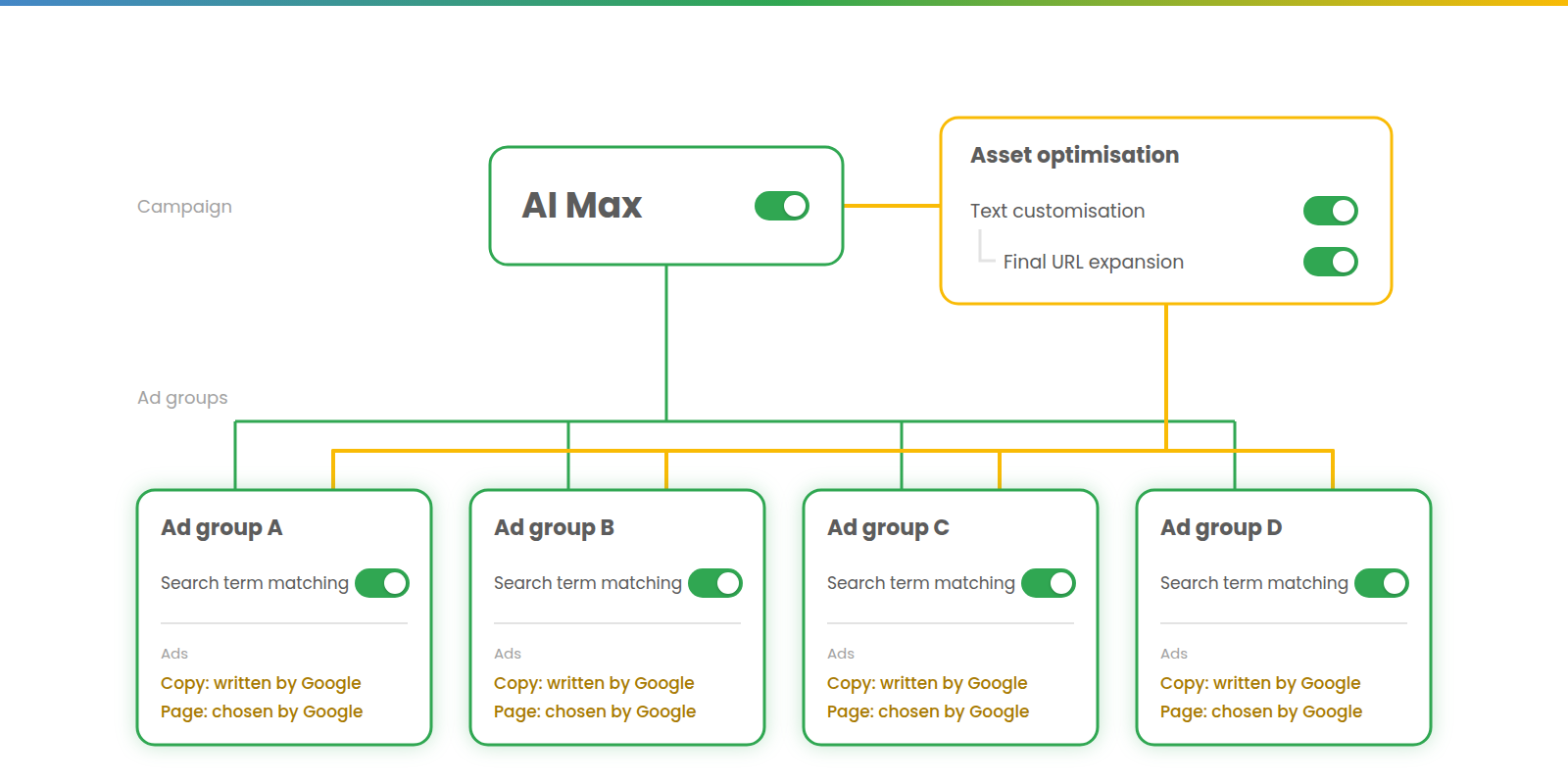
The settings sit in two layers. Search term matching, which governs targeting, lives at ad group level. It’s switched on in every ad group when AI Max is enabled, and can be switched off at the individual ad group level.
Asset optimisation lives at campaign level and holds the other two settings, text customisation and final URL expansion, both on by default. Final URL expansion depends on text customisation – turn text customisation off and final URL expansion goes with it.
With this maximal setup, every ad group expands its matching to broad match level and beyond, with both ad copy and landing page choice made at Google’s discretion.
Search term matching
Search term matching is the targeting branch, still labelled beta in the interface. It has two effects:
- It makes every keyword behave as broad match.
- It adds keywordless matching, finding queries from your landing pages and ad copy, like Dynamic Search Ads.
The first of those needs some care. Search term matching doesn’t change your keywords’ match types. It adds broad match behaviour on top of them. An exact match keyword still wins an identical query, but it can now also catch whatever a broad version would have.
That means that your starting point makes a big difference. The less broad you already are, the more of AI Max’s lift is just broad match you could have had anyway. So if you’re starting from a largely exact match setup, the better move is to try broad first. If you’re already on broad, it’s working and you want more, AI Max adds only the keywordless layer. That’s a much smaller increment, but it’s also the cleanest test of what AI Max adds.
Either way, the expansion comes with broad match’s usual costs. Broad has a wider field from which to pick valuable auctions, and sometimes it uses that well, but it can also go further off track and converts at a lower rate on average. How much lower depends partly on the bid strategy, as Adalysis’s excellent match type study shows. But in short, if you’re wary of broad match (which you may well be), then you have even more reason to be wary of AI Max.
It also tends to lean quite heavily into competitor terms (Thomas Eccel has dubbed it ‘Competitor Max’) and, where it can, brand terms, which the brand controls (covered below) are there to rein in. I’ve gone through the evidence on efficiency in more detail in an earlier blog post.
To see what search term matching is doing, read the search term match type segmentation rather than your keyword rows, and even then, don’t assume every AI Max match is incremental. Expect impression share to fall as well, since the pool of auctions you’re measured against grows.
Text customisation
Text customisation is ‘automatically created assets’ under a new name. Google writes and adapts headlines and descriptions for each query, drawing on your landing pages and the assets you’ve supplied.
Your own headlines and descriptions still serve, but no longer exclusively. Google’s lines can appear alongside them, tailored to the search.
The cost is control, and that matters for performance as much as anything. Deliberately written ad text – often with pinning – frequently outperforms freewheeling RSAs. Text customisation means Google not only selecting and ordering your lines but writing new copy for your ads and serving it without your approval – and that’s before you consider brand or compliance. Text guidelines (covered below) let you constrain what Google writes, but still not sign it off.
Final URL expansion
Final URL expansion lets Google choose the landing page for each query, from anywhere on your site, instead of using the final URL you set.
It depends on text customisation, but the dependency only runs one way. Final URL expansion can be switched off on its own, leaving text customisation in place.
That matters for two reasons. The first is pinning. While final URL expansion is on, your pins aren’t respected. Turn it off, along with any URL inclusions, and you get your pins back while keeping text customisation.
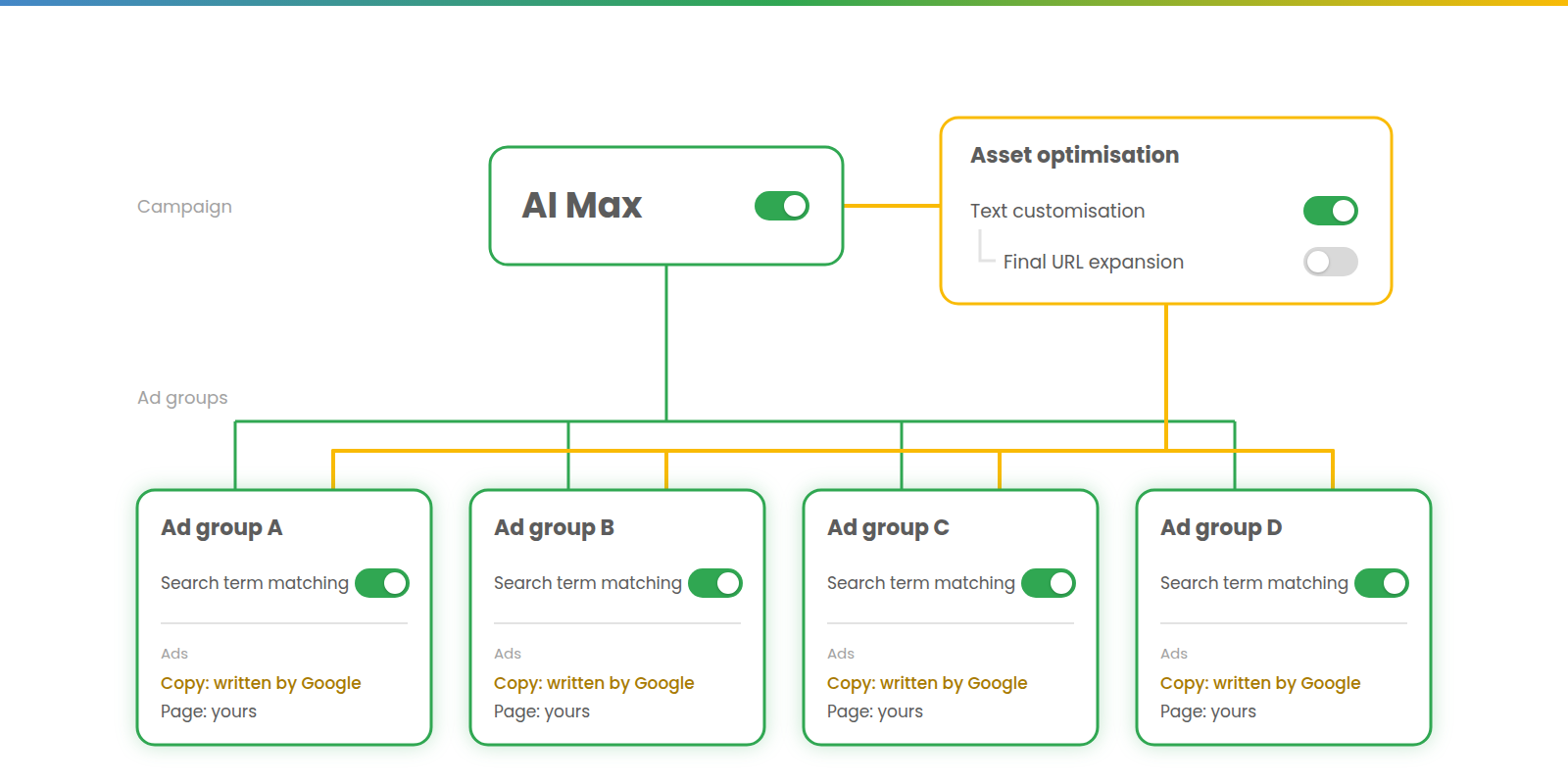
The second is that we usually know which pages we want people to land on, and which we don’t, for good reasons. Left to choose, Google can send traffic to pages that are out of date or have no commercial value. Landing pages are a very legitimate area to want to keep control over, and final URL expansion often carries more danger than benefit.
Switching off targeting isn’t opting out
This is perhaps the most likely point to catch us out.
If you switch off search term matching for an ad group, its keywords go back to matching according to their own match type rules. It would be natural to assume that the ad group is now free from AI Max. It isn’t. Text customisation and final URL expansion are set at campaign level, so they reach every ad group in the campaign, whatever its targeting.
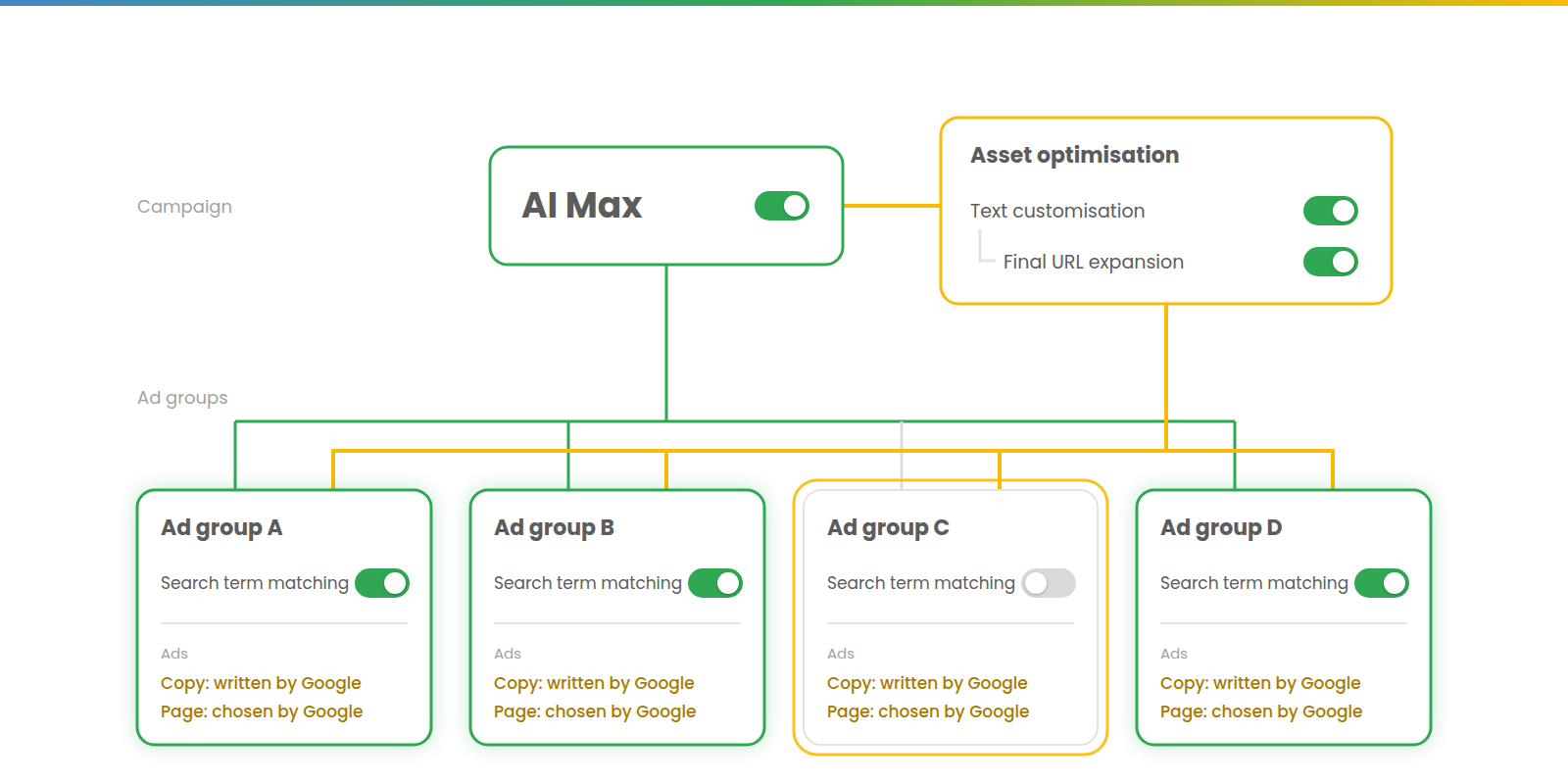
In the diagram, ad group C has search term matching off. Its keywords behave as their match types say they should, but Google is still writing its ad copy and choosing its landing pages.
So the ad group switch takes an ad group off one branch of AI Max, but leaves it on the other. If you want an ad group’s copy and pages to be entirely your own, the asset settings have to come off for the whole campaign, or the ad group has to move to a campaign without them.
The controls
AI Max also brings a set of controls, most of them for reining in the expansion.
Brand inclusions and exclusions control which branded searches can trigger your ads. Inclusions limit them to searches containing the brands on your list, exclusions block searches containing the ones on yours, and a simpler third option restricts them to unbranded searches.
Locations of interest are set at ad group level, and in Search they only exist within AI Max. They reach people showing interest in a place, wherever they’re searching from, and only work if the campaign’s location setting includes interest.
Text guidelines constrain text customisation, through term exclusions and messaging restrictions.
URL inclusions point page selection, and search term matching, towards pages you choose; exclusions keep page selection away from pages you’ve ruled out.
Choosing your combination
Put the three switches together and you get six possible combinations. Search term matching is set per ad group, so a single campaign can have ad groups in both rows.
| Text customisation + final URL expansion | Text customisation only | Text customisation off | |
|---|---|---|---|
| Search term matching on | Everything on | Pins back | Your ads, your pages |
| Search term matching off | Page selection without expansion | The old ‘automatically created assets’ | The empty shell |
Everything on
This is the default, and it’s an expansion move, not generally an efficiency one. It has a role when you’re happy to get more of the same, or more at slightly worse efficiency, and want to give Google the freedom to roam. In effect it’s the expansion of broad match and the freedom of DSA, rolled into one and slightly dialled up – aggressive rather than defensive.
The main warning is the efficiency one from above. If you’re budget-constrained, you can probably add volume more efficiently without AI Max than with it. Don’t open a second branch while you’re still turning people away at the door of the first. And with three expansions running at once, when performance moves you can’t easily tell which one moved it.
Pins back
You keep the reach and Google’s help with copy, but get your pins and your landing pages back. That matters mainly for performance, since pinned RSAs often outperform unpinned ones and we usually know which pages we want users to land on, and secondarily for compliance.
The catch is that while your pinned positions are held, any position you haven’t pinned is open to Google’s copy.
Your ads, your pages
This is query expansion only. It’s the setup for testing the expansion cleanly, because with copy and pages fixed, any change in performance came from the change in targeting. It’s also the natural choice if you know the expansion is what you want.
The warning follows from earlier. If you’re mostly on exact match, much of what you’re testing is broad match in disguise, and you may end up crediting AI Max with what a broad keyword would have done.
Page selection without expansion
This setup is rarely chosen on purpose (it’s more likely to be where you end up after switching search term matching off and forgetting that asset settings are still on).
The one deliberate case is a large site where your keywords are right – more right than Google’s page-led matching would be – but your mapping of keywords to pages is approximate. Page selection then sharpens the routing without widening the targeting.
The risk comes from the dependency. When you allow page selection, Google’s copy comes along for the ride, and your pins stop being respected.
The old ‘automatically created assets’
This one suits you if you were happy with automatically created assets and want a like-for-like replacement, or if you have lots of differentiated ad groups and want Google’s help differentiating the ad text between them.
The same catch applies as with pins back. While your pinned positions are held, any position you haven’t pinned is open to Google’s copy, which runs without your sign-off.
The empty shell
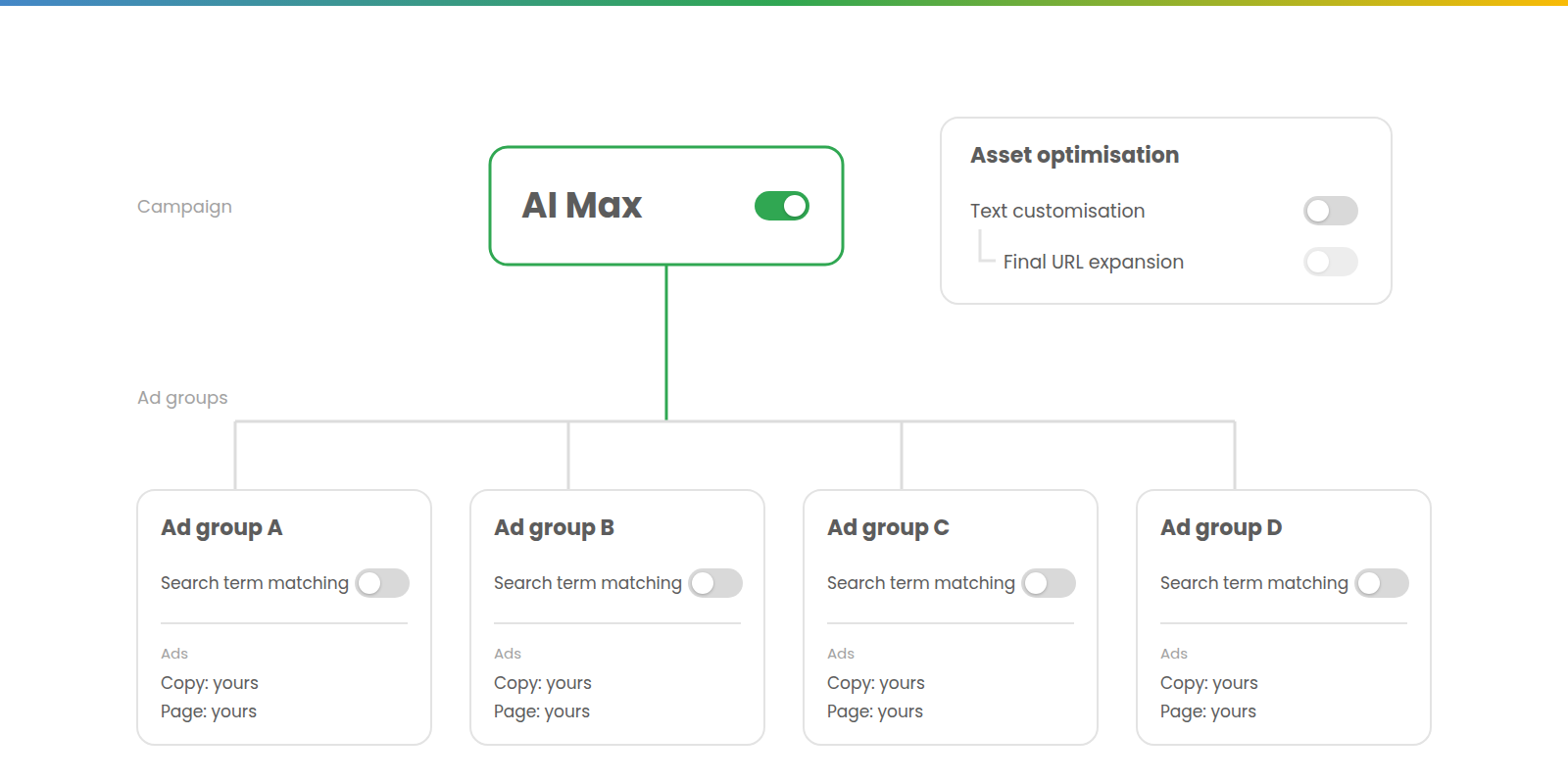
With search term matching off everywhere and text customisation off, AI Max is still on, but nothing is expanding. This shows AI Max’s hotchpotch nature, since the master toggle does nothing on its own.
In practice, it’s a holding position. Everything’s in place to switch branches back on ad group by ad group, and the brand controls stay live. Whether they constrain your own broad keywords – as brand restrictions for broad match formerly did – is not settled by Google’s documentation.
AI Max remains ready to pounce, so any new ad group will arrive with search term matching on. If you don’t want AI Max features, turn the AI Max toggle off.
Where the migration left you
This grid is also the way to read the September migration, which automatically moved Search campaigns using the campaign-level broad match setting or automatically created assets to AI Max. Dynamic Search Ads follow in February 2027.
The two routes landed in different cells. Broad match setting campaigns got search term matching only, which puts them in ‘your ads, your pages’. Automatically created assets campaigns got search term matching as well as text customisation.
A setting that was purely about your ads opted you into significantly wider targeting. If your campaigns migrated, it’s worth checking which cell they landed in and whether it’s where you would choose to be.
Whichever cell you end up in, it should be one you’ve chosen. The default is a choice too – just not one you made.